Case Study: SaaS License Monitor
Tech Stack
Contents
Problem
The Information Systems team at a publicly traded SaaS company manages licenses across a growing portfolio of SaaS tools. Checking capacity meant logging into each system individually — different interface, different reporting format, no consistent cadence. Staying current required constant context switching with no central view to anchor it.
Without alerting, shortages only surfaced when a new hire couldn't be provisioned. At that point, the remediation path — identifying removable users, requesting additional licenses, waiting on vendor processing — added days of delay to onboarding. There was no utilization history, no trend data, and no data foundation for renewal conversations. Which systems were trending toward capacity? Which warranted a seat reduction at renewal? The team couldn't answer without manual research from scratch each time.
Every shortage was reactive. Every incident was avoidable.
Role
Built end-to-end as a solo project — no dedicated data engineering support, no handoff between design and implementation. Full scope ownership: identifying the problem, designing the architecture, authoring all business logic, writing every line of SQL and LookML, configuring the pipeline, and documenting the system for the team.
Domain expertise was as important as the technical build. Which user types count against license usage, which system admin accounts should be excluded, how different Salesforce instances expose their data differently through the same Fivetran connector — none of that is in a manual. All of it was encoded from scratch as documented, versioned logic.
Approach
The architecture question before writing any SQL: how do you build something that works for five Salesforce instances today but doesn't need to be rebuilt for the next ten systems?
The answer was a staging contract — a binding agreement on what every data source must output before it feeds the pipeline. Eight columns, always the same, regardless of source. The contract is fixed, so the serving layer never needs to know where data came from. Each source has its own isolated staging view, so a change in one system touches nothing else. The assembly query is a pure UNION ALL — adding a new system means writing one view and uncommenting one line.
Two other decisions shaped the build. Pure SQL over dbt — the team doesn't have dedicated data engineering capacity, and a framework with its own learning curve would have made this a system only one person could maintain. Utilization pre-computed at assembly time rather than in Looker — keeps dashboard performance predictable as the dataset grows and eliminates division-by-zero errors at the visualization layer.
Architecture
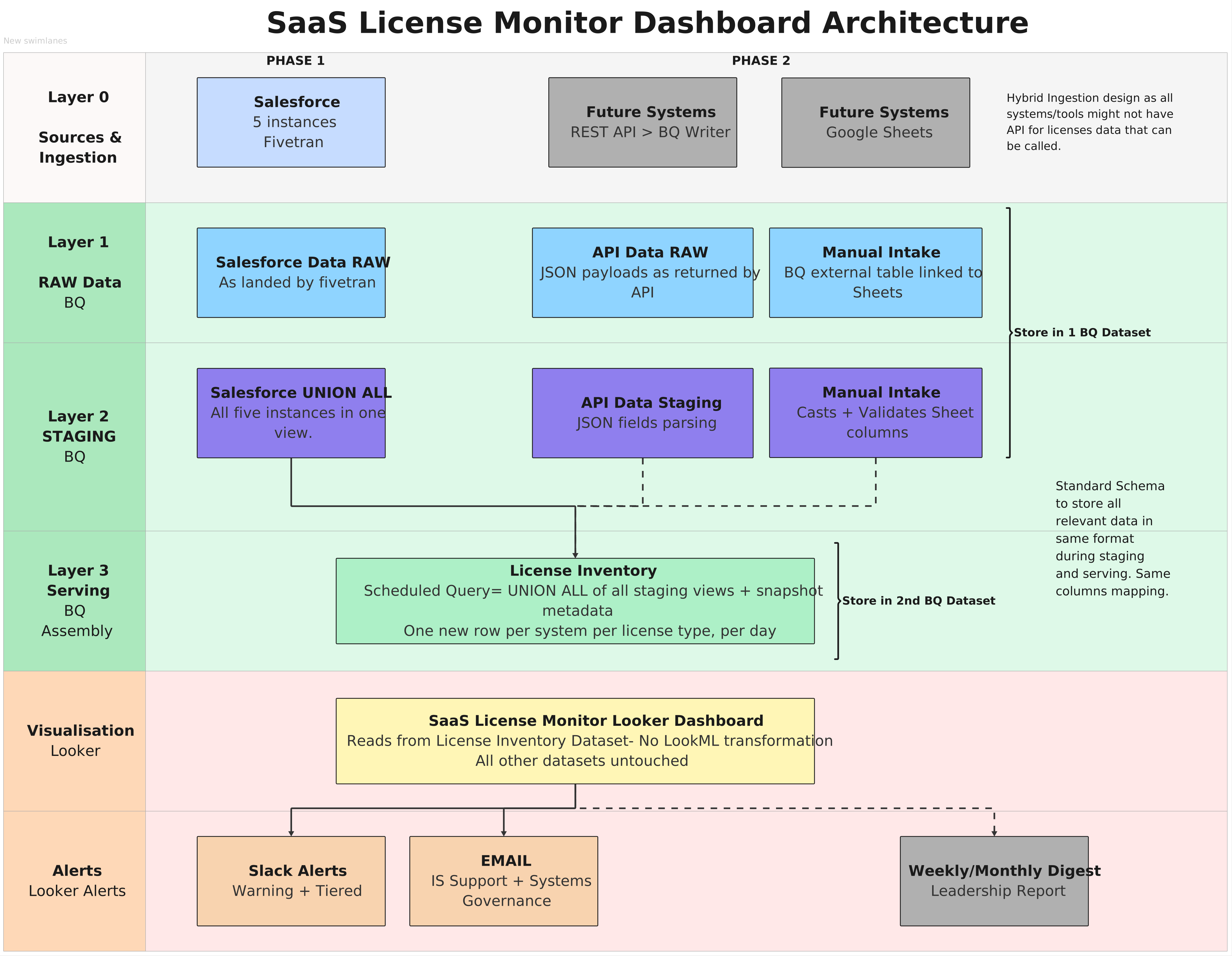
Four layers, each with exactly one job:
Ingestion — Fivetran syncs Salesforce data into BigQuery every 40 minutes. Data lands in raw datasets, untouched.
Staging — SQL views transform raw data per-source into the standard 8-column schema. All business logic lives here and nowhere else. All five Salesforce instances are combined into a single view via UNION ALL.
Serving — A scheduled query runs at 06:00 UTC, assembles all staging views, and appends a daily snapshot to license_inventory. An idempotency guard (DELETE WHERE snapshot_date = CURRENT_DATE()) runs before every insert, making reruns safe.
Alerting — Looker evaluates thresholds at 06:30 UTC and fires to Slack and email. Threshold logic lives in LookML, not SQL — updatable without touching the pipeline.
Key Features
Three-section dashboard, designed for three audiences:
- Health summary — total, used, and available licenses across all systems; count of systems at critical or warning; data quality issue count. Readable at a glance by anyone.
- System detail — utilization bar chart, full license breakdown with conditional formatting by alert status, available licenses by type. For IS admins managing day-to-day provisioning.
- Trend view — available licenses and utilization over time, per system. For renewal planning and management reporting.
Tiered alerting, evaluated daily before the business day starts:
- Critical (< 5 available seats) → Slack + email to all IS admins
- Warning (< 10 available seats) → Slack to IS team lead
- Weekly PDF digest → IT management and VP, Monday 08:00
Extensible pipeline — adding a new system requires one staging view and one uncommented line. The serving table, LookML model, and dashboard never change. Phase 2 covers REST API ingestion, Google Sheets manual intake, and Cloud Run scrapers for tools without accessible APIs.
Data quality visibility — data_quality_flag is part of the staging contract. Failed ingestion writes a descriptive flag ('api_failed', 'stale') rather than a zero or missing row. The health summary tile surfaces it directly — broken ingestion is visible without checking pipeline logs.
Three years of daily history retained via BigQuery partition expiry, enabling trend analysis and year-over-year renewal comparisons.
Handling the Hard Cases
One Salesforce instance doesn't expose a user_license table through Fivetran — the pre-aggregated source the other four rely on. License usage had to be reconstructed from the raw user table: filter active users, exclude system-level account types, map internal user_type codes to human-readable license categories, aggregate by category, and apply hardcoded contract totals — including a -2 adjustment for system/admin accounts that hold licenses but aren't real provisioned users. Instance-specific, fully documented in the staging view, invisible to everything downstream.
Phase 2 adds a different challenge: tools without a Fivetran connector and possibly no API. The solution was a decision tree for ingestion method selection — REST API where one exists, a Google Sheets External Table where a monthly manual intake is viable, and a Cloud Run scraper as a last resort. In all three cases, raw data lands in BigQuery, a staging view normalizes it to the contract, and one line is uncommented in the assembly query. The pipeline doesn't need to know how the data arrived.
Impact
| Before | After | |
|---|---|---|
| How shortages were discovered | User couldn't be provisioned | Slack alert at 06:30 UTC before anyone is affected |
| Capacity check process | Manual, per-system, no consistent cadence | Single dashboard, all systems, updated daily |
| Trend visibility | None | 3 years of daily snapshots retained |
| Renewal planning basis | Anecdotal | Data-driven utilization history per system |
| Alerting | None | Automated, threshold-based, tiered by severity |
| License logic documentation | Tacit knowledge | Encoded in SQL, versioned, editable |
What I'd Do Differently — and What's Next
Thresholds. Fixed thresholds (< 5 critical, < 10 warning) applied uniformly across all license types don't reflect how different pools behave. A pool of 500 Chatter seats and a pool of 1 Analytics Integration seat are not equivalent risks. Percentage-based or per-system configurable thresholds would be more meaningful — a known gap to address before Phase 2 ships.
Scrapers. In retrospect, I'd push back harder before recommending the scraper path. Scrapers break when admin UIs change, require credential management, and add monitoring overhead. A stronger case that no API or partner integration exists should be required before defaulting to one.
Manual intake. The Google Sheets External Table approach works but puts data freshness entirely in a human's hands. A staleness flag for rows not updated within 35 days and a proactive admin reminder would close that gap. The flag logic is in the design; the reminder system isn't built yet.
What's next. Phase 2 — extending the pipeline to the rest of the SaaS portfolio using the hybrid ingestion model already designed and documented. The natural next layer beyond that is cost attribution: correlating license spend against utilization to surface rationalization opportunities at renewal, not just shortage warnings.